Record money spent (Spend Money)
Spend Money records money leaving a bank account directly — a card payment for fuel, a software subscription, a till purchase — without raising a supplier bill first. It is the quick way to book everyday expenses; for invoiced purchases you pay later, use a purchase invoice instead.
Before you begin
- Sign in and select your organisation. You need the post purchase invoices permission to record, and void to undo.
- You need at least one bank account.
- Spend Money posts to your ledger immediately — there is no draft. To undo one, you void it.
Record an expense
- Go to Banking → Spend Money and choose Record Expense.
- Pick the bank account the money left, the date, and who you paid (Payee).
- Choose whether the amounts you are entering include VAT — receipts usually show gross (VAT-inclusive) figures, so the Amounts are Tax inclusive setting saves you doing the arithmetic.
- For each line, enter a description, pick a category (an expense or asset account from your chart), choose the VAT rate, and enter the amount. Use Add line for more rows and the × button to remove one; blank rows are ignored, and a running total of the amounts entered shows under the lines.
- Save. The transaction posts at once with a sequential SM- number.
Note: for a foreign-currency bank account, an exchange-rate field appears, prefilled with the latest stored rate for the transaction date — you can overtype it before saving.
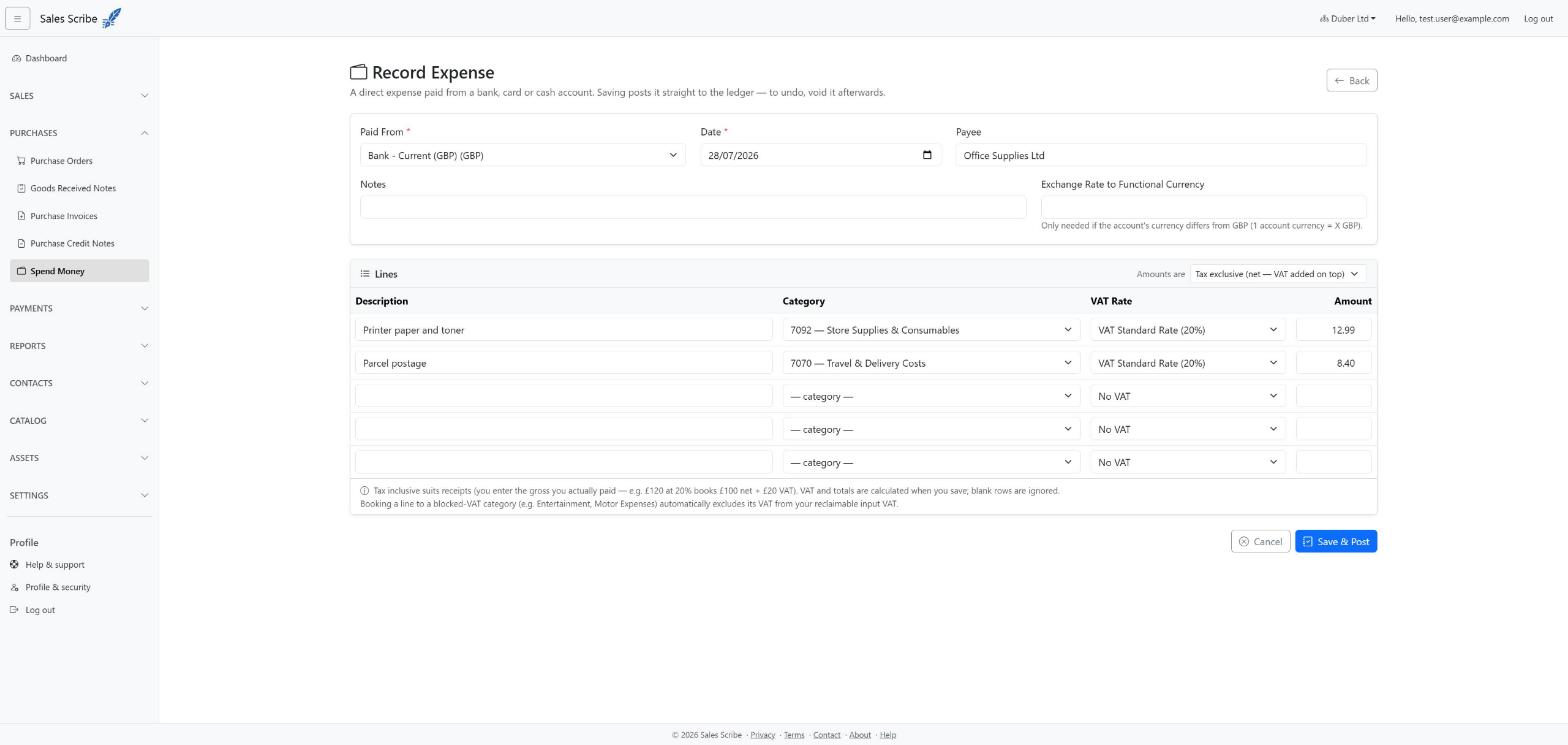
Choosing the right category
The category list offers expense and asset accounts — and any director's loan or other running account you keep, so you can record the company paying something out for a director. See Record money to or from a director.
If you pick a running account whose holder did not hold their office on the document's date, the entry is offered back to you for confirmation once before it posts.
What it does in your books
Each line's cost is booked to its category account, the VAT to your Input VAT account, and the total comes out of the bank account — so your bank balance, Profit & Loss and VAT summary all update together.
The journal line on the category carries your own line description — Spend money SM-00004 - Advance to former director. Several lines coded to the same account post as one journal line with their descriptions joined; if you left the description blank, the memo is just the document reference. That memo is what you read later on the general ledger and account transactions, so it is worth writing something.
Note: if a line's category is a blocked-VAT account such as Entertainment or Motor Expenses, its VAT is not reclaimed — it stays with the cost instead. See VAT on blocked expenses.
Undo a spend money transaction
Open it from the Spend Money list and choose Void, giving a reason. Voiding posts a reversing journal — the original stays visible with its history, and your balances return to where they were.