Manual journals
A manual journal is a direct entry into your general ledger — debits and credits you write yourself. It is the accountant's tool for the entries no document creates: accruals and prepayments, depreciation, and corrections. Most day-to-day bookkeeping never needs one; invoices, payments and Spend/Receive Money post their own journals automatically, and moving money between your own accounts has its own Transfers flow.
Before you begin
- Manual journals are available on the Pro plan and above.
- You need the view chart of accounts permission to see journals and manage chart of accounts to create or void them.
- Journals post immediately with a sequential MJ- number; undo by voiding.
Create a journal
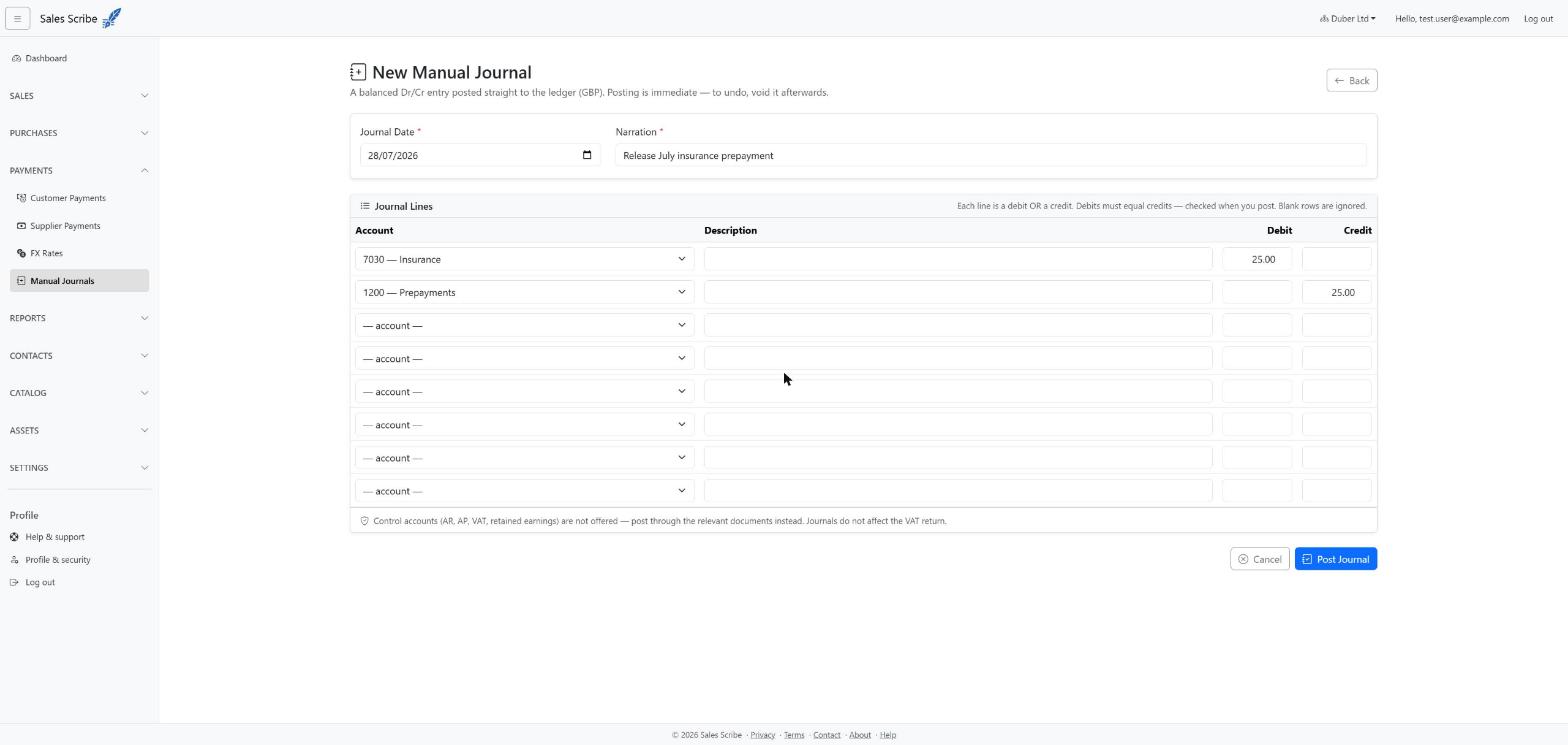
- Go to Banking → Manual Journals and choose New Journal.
- Enter the date and a narration — a short explanation of why you are making the entry. The narration is required: it is the audit story someone will rely on later.
- Leave the Currency on your functional currency, or pick another to enter the journal in that currency (see below).
- Fill in the lines: each line picks an account and either a debit or a credit amount — never both. Use Add line for more rows and the × button to remove one; blank rows are ignored.
- The journal must balance: total debits equal total credits. The totals row under the lines updates as you type and shows both figures in red while they disagree; posting is refused until they match.
- Post. Your reports pick the journal up immediately.
Journals in a foreign currency
Pick a Currency other than your functional one and an Exchange Rate to Functional Currency field appears, prefilled with the latest stored rate for the journal date (hover it to see the rate's date; you can overtype it). Amounts are then entered in the journal currency, and every line posts to the ledger at its converted functional value — the journal's details page and the journals list both show which currency the figures are in.
Accounts you cannot journal to
The account picker deliberately leaves out control accounts — Accounts Receivable, Accounts Payable, VAT control, reverse-charge VAT, Retained Earnings and other system accounts. These balances are maintained by your documents (invoices, payments, credit notes) and your VAT returns, and a manual entry against them would silently disagree with the customer, supplier and VAT records behind them. If one of these balances looks wrong, correct the underlying document instead.
The output VAT and input VAT accounts are the exception: a journal may post to them, but only on a line that says what it is on your VAT return (below).
Journals and your VAT return
Some VAT entries have no document behind them — bad-debt relief, a partial-exemption adjustment, a correction. Give a journal line its VAT and Treatment, and it reaches the right box of your VAT return like any other line:
- Purchase — input VAT (box 4) on your input VAT account. Bad-debt relief is a debit to input VAT against a credit to your bad-debt expense; a partial-exemption adjustment is a credit to input VAT against the cost. The other side needs no VAT of its own.
- Sale — output VAT (box 1) on your output VAT account.
- Sale — net (box 6) or Purchase — net (box 7) on any account a journal may use — an income or cost account, or a fixed-asset account for a capital purchase.
- Purchase — blocked input VAT for VAT that can't be reclaimed, posted to the cost account.
A line on the output or input VAT account must say which it is, and output and input VAT go only on their own accounts. A line with no VAT is on no return, as before.
A journal dated inside a return that is already finalised is picked up by your next return as a late adjustment — and so is voiding one: its reversal takes the return's figures back down there, never the finalised return's.
Note: your VAT return is built from your ledger, so it includes these lines. The VAT summary lists each of them, between your documents' figures and your ledger's.
Journals to a director's loan account
A person's running account can be journalled to like any other account — reallocating an expense to a director, crediting interest, a year-end adjustment.
Two things are worth knowing:
- If the journal increases what a person owes the company and they did not hold the office their account is named for on the journal's date, it is offered back to you for confirmation once before it posts. The net effect of every line on that account is what counts, not each line separately.
- A journal never prompts you to consider whether a credit is a new loan arrangement. On a receipt Sales Scribe knows money actually arrived; on a journal a credit may equally be interest, a correction, a dividend or a salary credit, and it will not guess.
Void a journal
Open the journal and choose Void, giving a reason. A reversing journal is posted and the original stays visible with its full history — nothing is ever deleted.